![Confido - Trademark - Dark (2)-1.png]](https://confidolegal.com/hs-fs/hubfs/Confido%20-%20Trademark%20-%20Dark%20(2)-1.png?height=40&name=Confido%20-%20Trademark%20-%20Dark%20(2)-1.png)
Prerequisites
- The client must have an existing and valid Stored Payment Method.
Processing a Payment using a Stored Payment Method
- Navigate to Payments > Stored Payment Methods.
- Click the Process Payment button next to the client you wish to bill.
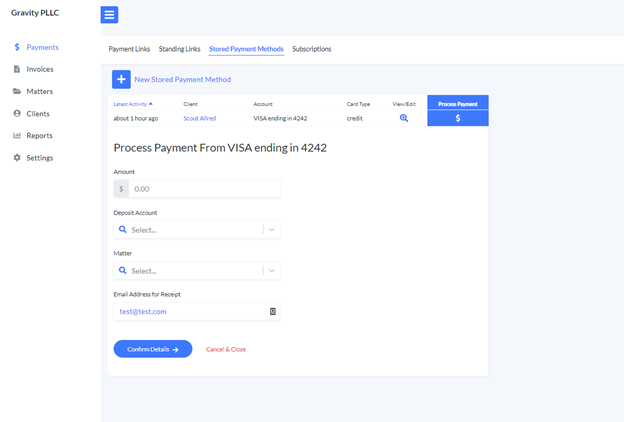
- Complete the fields
- Amount. The amount to be billed.
- Deposit Account. This is the bank account into which funds will be deposited after the payment is made.
- Matter (Optional). The matter associated with the payment.
- Email Address for Receipt (Optional). We will automatically send a receipt to this email address. The client's email address will pre-fill if it exists on the client's record. Alternatively, you can type in an email address for the client.
- Click Confirm Details.
- Review the payment information and click Process Payment to complete the payment.
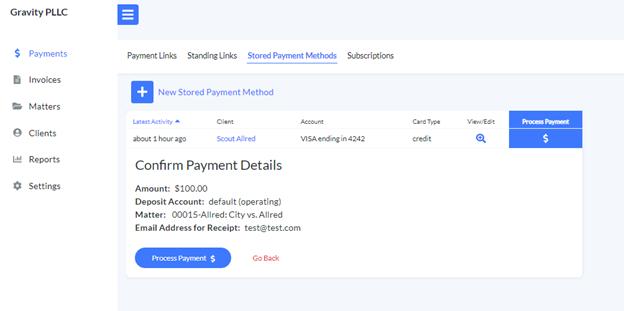
- A receipt will be emailed automatically to the email address provided.
- A payment alert will be emailed to the firm at the email address set in Settings > Firm Settings> Payment Notifications. You can make changes to your payment alert preferences at any time.